
See More, Identify Better: Introducing Multi-Photo Scan
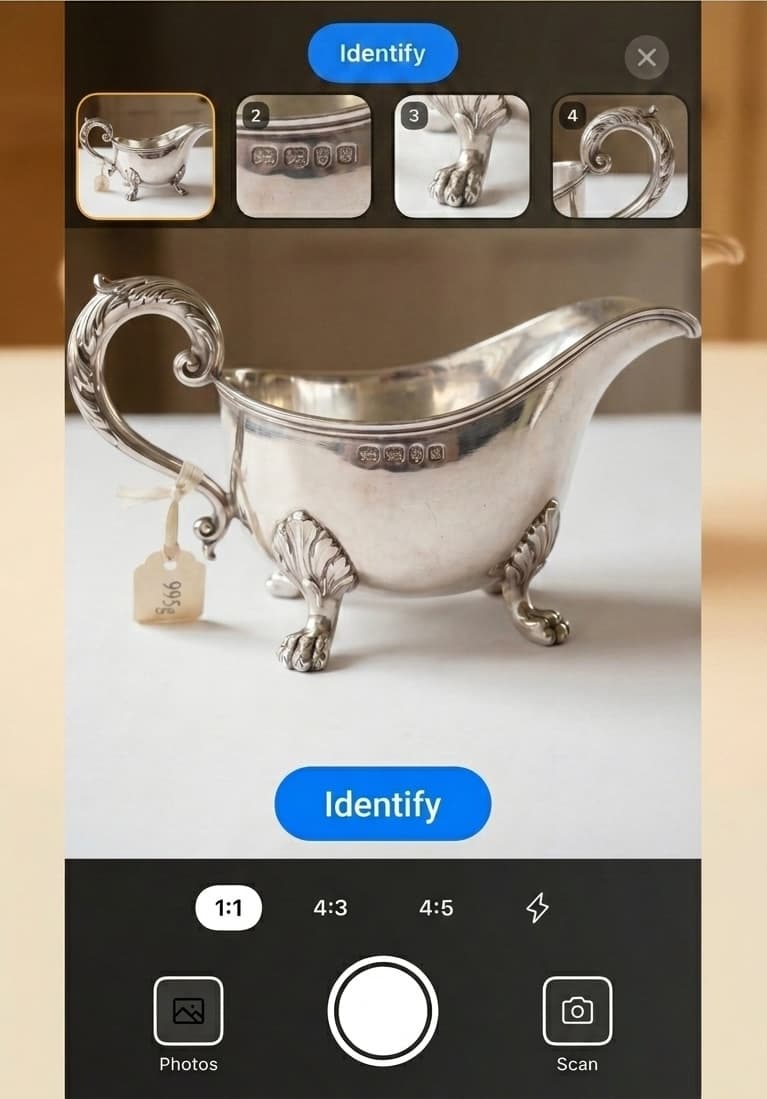
You can identify a single item with up to four photos in one scan, so Tocuro can produce a richer, more accurate identification. Multi-Photo Scan is included with Tocuro Collector.
See More, Identify Better: Introducing Multi-Photo Scan
The problem with one photo
A lot of what makes a piece identifiable isn't visible from a single angle.
The hallmark is stamped on the underside of the silver. The maker's mark is on the base of the lamp, not the shade. The coin tells you nothing without the reverse. The colophon — the page with the publisher, edition, and year — is buried inside the book. The furniture label is on the back of a drawer.
Single-photo identification is good when everything important is on one face. But experienced collectors know that the most useful details are often the ones that don't fit in one frame.
What Multi-Photo Scan does
Multi-Photo Scan lets you submit up to 4 photos of the same piece before identifying it. Tocuro uses all of them together — cross-referencing angles, marks, materials, and form — to build a more complete picture of what you're looking at.
It's designed for the moments when one shot isn't enough.
When to use it
Some item types almost always benefit from multiple angles:
- •Ceramics, china, and pottery — base mark + glaze/pattern + form
- •Coins — obverse + reverse (the standard two-shot ID)
- •Silver and metalwork — hallmarks are small; one shot of the mark, one of the full piece
- •Books — title page + colophon + spine
- •Signed art — signature detail + full composition + any edition or plate marks
- •Glassware — pontil or base mark + color + form
- •Jewelry — hallmark or clasp stamp + overall design + any stone details
- •Leather goods — maker's stamp + hardware + lining label
- •Rugs and textiles — back label + weave structure + pile detail + full pattern
- •Clocks — dial + movement back + case profile
- •Maps and prints — cartouche or engraver's mark + full image
- •Furniture — overall form + joinery details or back-panel labels (especially common on case pieces and chairs)
If any of these sound familiar, this feature was built with you in mind.
How to use it
- •Open the Identify screen and tap Multi-Photo Scan in the capture controls to switch into multi mode.
- •Capture or upload photos one at a time — up to 4 slots.
- •Fill at least 2 slots before the Identify button becomes active.
- •Tap any filled slot thumbnail to preview it — tap Delete to clear the slot, or Done to keep it and go back.
- •Tap Identify when you're ready.
The result screen works the same as always — you'll see the identification, estimated value, and analysis reasoning for the piece as a whole.
A few things to know
- •Included with Tocuro Collector — Multi-Photo Scan is available on monthly and annual Collector subscriptions.
- •Beta — This is an early version. Results will improve as we refine how multi-image analysis works. Feedback (thumbs down, notes) helps.
- •One identification per scan — A multi-photo scan uses one identification, regardless of how many photos you submit.
Try it
If you are on Tocuro Collector, Multi-Photo Scan is live on your Identify screen now.
Not on Collector yet? See what is included with a Monthly or Annual plan.
Photo identification
Identify Your Item
Use Tocuro to identify your item from a photo and get an estimated value range when market data is available.